 iDigi
iDigi
Stuck? Three ways to reach help.
No software is free of bugs. If something is wrong, tell me — reports from users are how iDigi gets better.
Report a bug
Open a ticket on GitLab so the problem is tracked until it's fixed. A GitLab account is needed.
Open a ticketEmail me
No GitLab account, or a question that isn't a bug? Write to me directly and I'll answer.
info@idigi.chJoin the group
Swap settings, antennas and results with other iDigi users in the Facebook group.
iDigi on FacebookFrequently asked questions
This page grows as questions arrive at support. If yours isn't here, send it to info@idigi.ch.
The toolbar isn't visible in Preferences or the Log Window
Go to the View menu and select Show Toolbar.
Setting up an SSTV or WEFAX image gallery on your own website
iDigi can upload received SSTV and WEFAX images to an FTP server automatically, which gives you an online gallery of everything your station has received. My own gallery is at idigi.ch/sstv for reference.
Configure the upload in Preferences
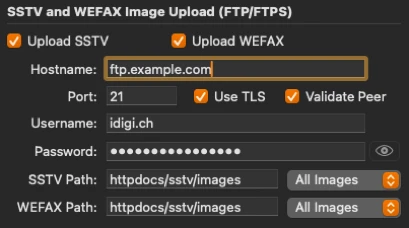
On the Integrations tab, enable Upload SSTV and/or Upload WEFAX, depending on what you want sent automatically. Enter your FTP connection details and credentials.
Enable Use TLS and Validate Peer if your provider supports them. Without TLS, your credentials are transmitted in the clear.
Set the upload path
Give the path relative to your web server's base directory. HTML content often lives in htdocs or httpdocs.
Add a gallery page
If you don't already have a page to display the images, use mine. Download the ZIP, unzip it, and put index.php somewhere on your web server. Create a subdirectory called images in the same place — that's the directory you enter as the path in iDigi's preferences.
Enable PHP
The gallery page needs PHP enabled on your web server.
Privacy
iDigi collects no personal data and contains no tracking or analytics. This website sets no cookies and runs no third-party trackers.
The application communicates only with the services you configure yourself — your logger, your rig, and the callsign and confirmation services you enter credentials for. Those credentials stay on your Mac. Mail you send to info@idigi.ch is used only to answer you.